New here? Learn how it works →
See the guideStop chasing people for raids.
Create Your First Guild Event
In 2 minutes, you'll have a professional event system running in your Discord.
No installation required
Already invited? Go to Discord and type /michi_event create.
3 Steps to Get Started
Open Discord
Go to any channel in your server.
Type /michi_event create
Fill in name, date, time. Done.
You'll see a form to create your first event.
Learn More
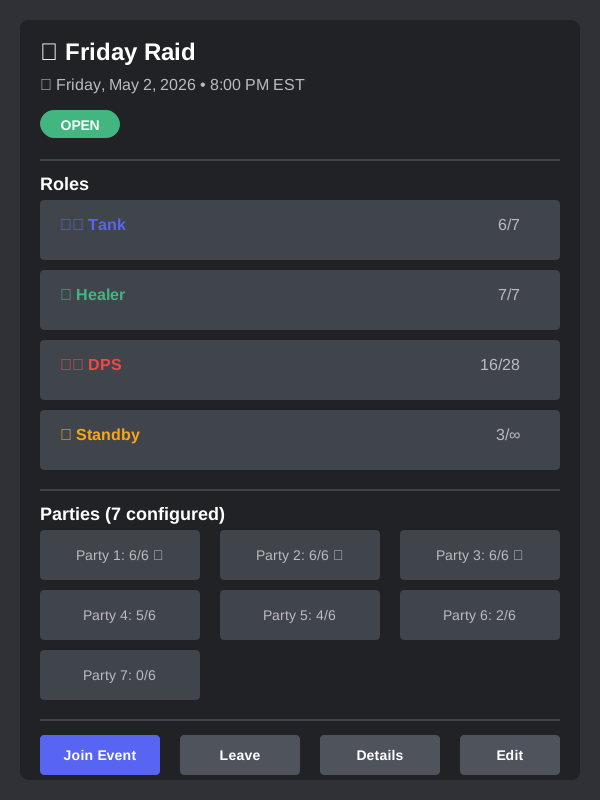
Members click a role button (Tank, Healer, DPS), select a party from the menu, and done. The event updates in real-time.
Events use roles (Tank, Healer, DPS, Standby) and organize into configurable parties. The bot calculates limits automatically: 1 Tank + 1 Healer per party.
The bot sends automatic reminders at 30, 15 and 5 minutes before start. You can configure a role to mention in each reminder.
A loot raffle system. Leaders create drops, members participate, and the bot picks a winner with 3 modes: random, role priority, or attendance-weighted.
A points system that rewards attendance. View your points with /michi_points view, check the guild ranking, and see your complete history. Leaders can adjust points manually.
A request management system. Members create requests for items, lucent, or materials with /michi_request create. Leaders can approve, reject, or request more info. Everything stays organized with states and threads.